Cinematic Camera: Difference between revisions
Jump to navigation
Jump to search
ChillGenXer (talk | contribs) No edit summary |
ChillGenXer (talk | contribs) |
||
| Line 10: | Line 10: | ||
<gallery> | <gallery> | ||
File:MotionPathEditor.png | File:MotionPathEditor.png|The Cinematic Camera Menu | ||
File:CinematicCameraKeyBindings.png | File:CinematicCameraKeyBindings.png|Game Settings Key Bindings | ||
</gallery> | </gallery> | ||
[[Category:Game Mechanics]] | [[Category:Game Mechanics]] | ||
Revision as of 04:56, 10 November 2022
Overview
The 'Cinematic Camera allows a player to set up a repeatable camera path within the game to create cinematic movements through the world.
Usage
The Motion Path Editor can be started by pressing Ctrl+Shift+1. Usage of the editor is explained by the developer in DevLog 60, "You can finally play! - Sapiens Devlog 60"
Default Key Bindings
-
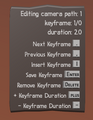 The Cinematic Camera Menu
-
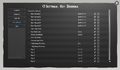 Game Settings Key Bindings

